
Smart robot vacuums have altered household cleaning by incorporating smartphone control and cognitive features to improve convenience and efficiency. These applications enable users to establish cleaning schedules, see maps, measure performance, and personalize cleaning zones from anywhere. The greatest robot vacuums not only clean thoroughly, but they also integrate seamlessly with your mobile device, providing you with complete control over your home’s cleanliness. App control is essential for controlling several rooms, responding to different floor kinds, and creating no-go zones. This tutorial describes the important app features to look for and how they help with day-to-day maintenance in any contemporary house.
Core App Features Every Smart Robot Vacuum Should Offer
Real-Time Mapping, Room Recognition, and Floor Plans
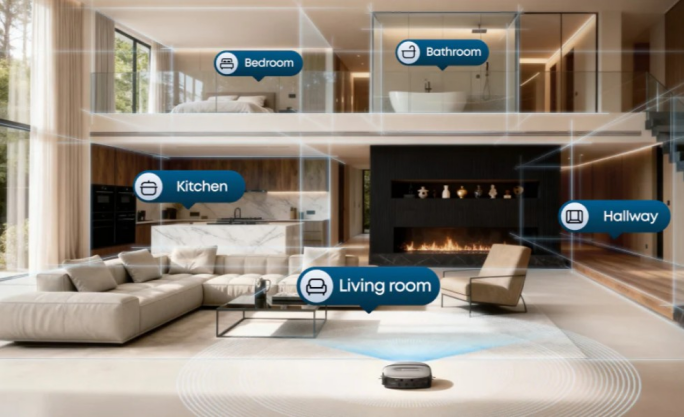
Real-time mapping shows consumers where their robot vacuum is in the house and which areas have been cleaned. Advanced models employ LIDAR or vSLAM technology to generate precise floor layouts that are kept in the app. These maps offer room identification, enabling you to designate certain rooms, such as the kitchen or living room, for more targeted cleaning. Multi-floor mapping is also required for houses with numerous stories. Once mapped, you may easily pick individual rooms for scheduled or on-demand cleaning. This feature not only enhances control but also efficiency by eliminating repetitive passes and assuring comprehensive coverage throughout all floor layouts.
Scheduling, Cleaning Modes, and Custom Routines
The option to schedule cleaning sessions using the app provides consumers with hands-free ease and control. You may create daily or weekly routines, change cleaning modes based on floor type, and even schedule particular times for each room. Some vacuums use adaptive learning to propose cleaning times depending on your behavior. Custom routines allow you to follow varied cleaning schedules, such as vacuuming the living room every day but just once a week in the guest room. Users may also switch between eco, regular, and turbo settings straight via the app. These scheduling capabilities guarantee that your vacuum fits your lifestyle, keeping your environment clean with minimum daily input or reminders.
No-Go Zones, Virtual Walls, and Spot Cleaning
App-controlled no-go zones and virtual barriers let you block off locations that the vacuum should avoid, such as pet bowls, wires, or sensitive furniture. These zones may be drawn immediately on the map with a few touches. Unlike physical barriers, virtual limits provide greater flexibility and personalization. Spot cleaning functions focus on tiny, high-traffic areas such as under the dining table or in entryways. Simply tap the region on the map or use the app to manually steer the vacuum. These controls enable you to handle room-specific requirements, enhance safety, and improve cleaning precision. They are crucial for homes with mixed-use areas or specialized zones that require extra attention.
How App Control Improves Daily Cleaning and User Experience
Live Tracking, Cleaning History, and Performance Reports
Live monitoring displays the vacuum’s real-time location, letting you follow progress and verify that it is covering the desired regions. Many programs include a cleaning history record that displays previous sessions, duration, coverage, and battery consumption. This aids in identifying missing places or trends that may require modifications. Performance reports show how frequently the vacuum cleans certain rooms, how much space it covers, and when maintenance is necessary. Some sophisticated models can advise scheduling modifications based on consumption patterns. These features not only increase transparency but also let you enhance performance over time, making robot vacuum ownership more instructive and efficient.
Remote Control, Manual Steering, and On-Demand Cleaning
The app-based remote control lets users start, stop, and pause cleaning from anywhere. This is perfect for unanticipated messes or when visitors are on their way. Many applications also include manual steering, which allows you to direct the robot precisely to a specified location—ideal for spills or high-traffic areas. On-demand cleaning may be started via the app, no matter where you are, providing flexibility even when your schedule changes. You may also pick cleaning zones and switch modes remotely. These capabilities provide full control without the need for physical access to the device, making it easier to operate your vacuum as part of a smart home ecosystem.
Multi-User Access and Home Sharing Settings
Multi-user access allows different household members to control the robot vacuum through their own devices. Each user, whether a spouse, roommate, or child, has the ability to monitor activities, change timetables, and begin cleanings on their own. Some programs allow you to modify user rights, granting full access to certain users while limiting authority to others. Home sharing is particularly beneficial in big homes when duties are shared. You may also get numerous alerts across devices, ensuring that cleaning updates or problem information are received quickly. This collaborative feature improves convenience, decreases administrative burden on a single person, and guarantees that the robot vacuum remains active and responsive to everyone’s requirements.
Conclusion
App control is a distinguishing characteristic of current smart robot vacuums, allowing consumers more freedom, customization, and insight. Real-time mapping, cleaning schedules, and no-go zones make it simpler to manage the cleanliness of your house than ever before. Live monitoring, remote control, and multi-user support enhance the experience, ensuring that your vacuum seamlessly integrates into your daily routine. Whether you desire daily automation or exact control over each session, the proper software can turn your robot vacuum into a smarter, more useful cleaning helper. When selecting a model, emphasize great app functionality—it is the key to achieving long-term convenience and cleaning performance.